For sports clubs ready to quit their spreadsheets

Your club runs. On notes, group chats and Henk.One club platform, from attendance to membership fees

Clear the notice board

A notice board full of loose club business: a paper attendance list, messages from parents, a spreadsheet of unpaid membership fees, a schedule with a sports hall crossed out, a flyer for the bar shift, a note to call back about a taster lesson and a note saying the key to the ball shed is with Henk.

Everything in one place. Except the key to the ball shed — that just stays with Henk.

Lobby

Club AI in every plan

From notice board to platform

Where everything lives now

Club-tool bundles member management, scheduling, membership fees and communication into one AI-native, EU-hosted platform — starting at €0 per month.

  • Attendance list becomes AttendanceSee Tuesday in the club week
  • Messages from parents becomes Notifications & web push
  • membership_fees_v3_FINAL.xlsx becomes Membership fees & paymentsBasic
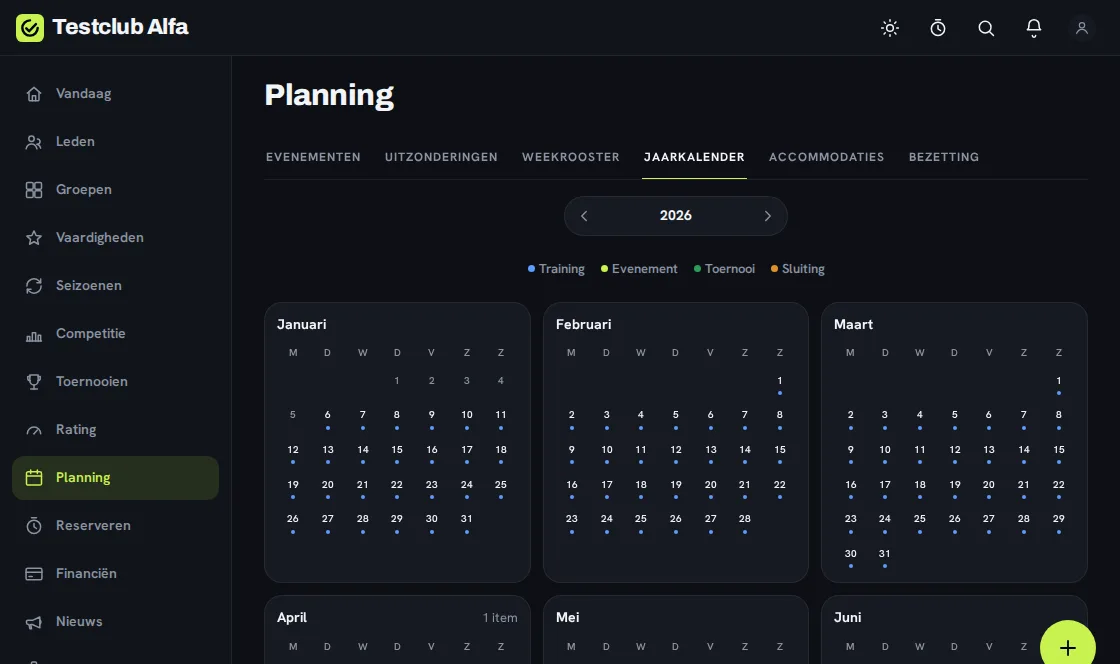
  • Schedule with “hall closed” becomes Scheduling & season rosterSee Thursday in the club week
  • Bar shift flyer becomes Volunteers & committeesBasic
  • Note “call back about taster” becomes Trial members & intakeBasicSee Wednesday in the club week
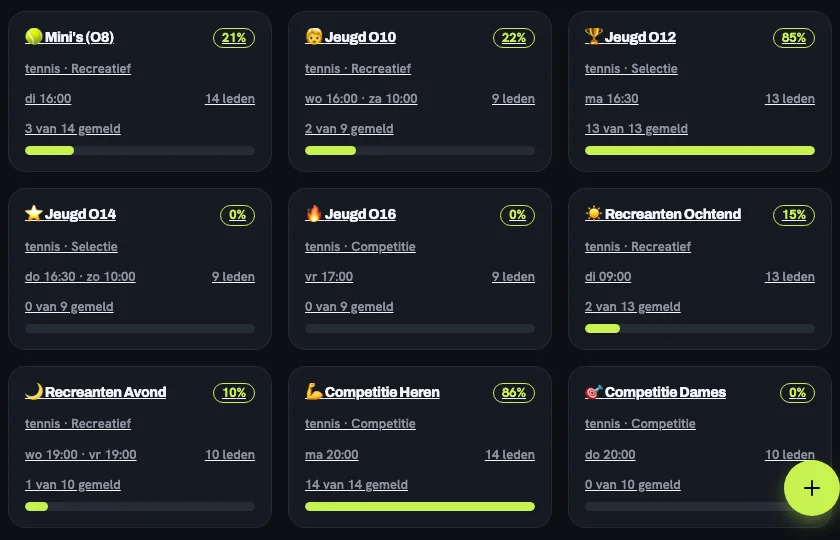
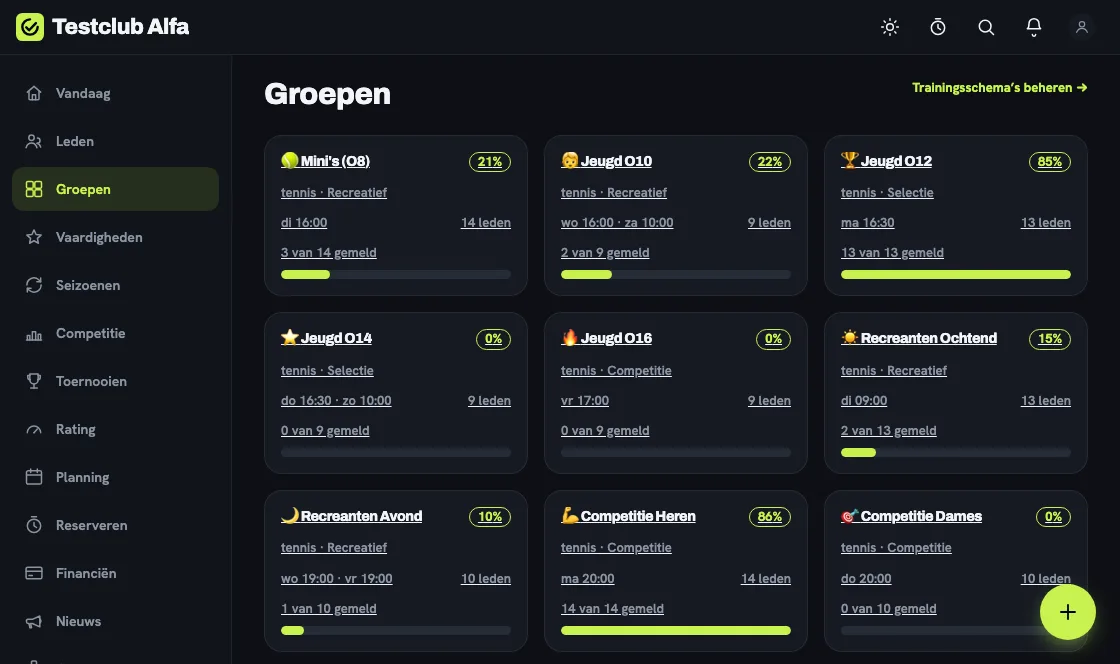
The groups overview: nine tennis groups as cards, each with training time, member count and a bar showing how many members checked in.

Every training group with today's turnout at a glance.

Real Club-tool screens, with test data.

Pitches

The club week

A week at the club

Not a list of features, but seven ordinary club moments — and what Club-tool does for you right then. With real screens.

  1. Monday 19:30Board room

    The new season is set up before the coffee gets cold.

    The member list from Excel or the old system goes in at once, using a template. Pick your sport and country, and Club-tool suggests the rest: from age groups to retention periods.
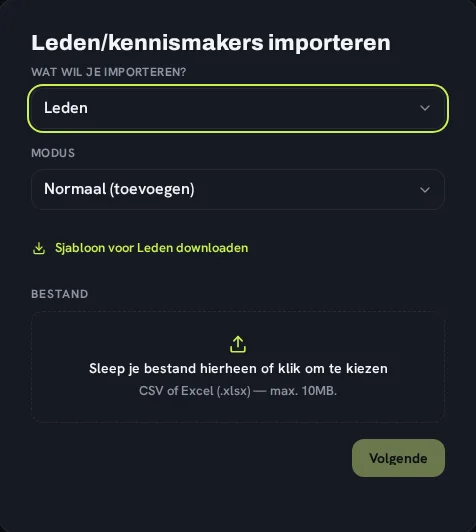
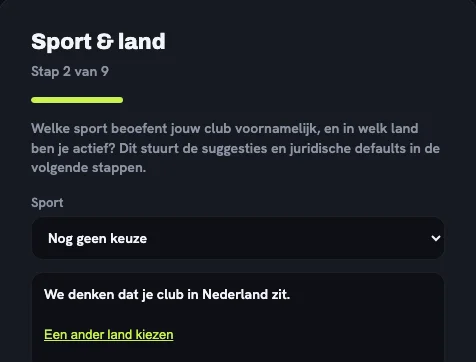
    The import dialog: choose what to import, download the template and drop in your CSV or Excel file.Step 2 of the setup: choosing sport and country, explaining which rules the country determines.
  2. Tuesday 16:00Pitch 2 · Under-8s

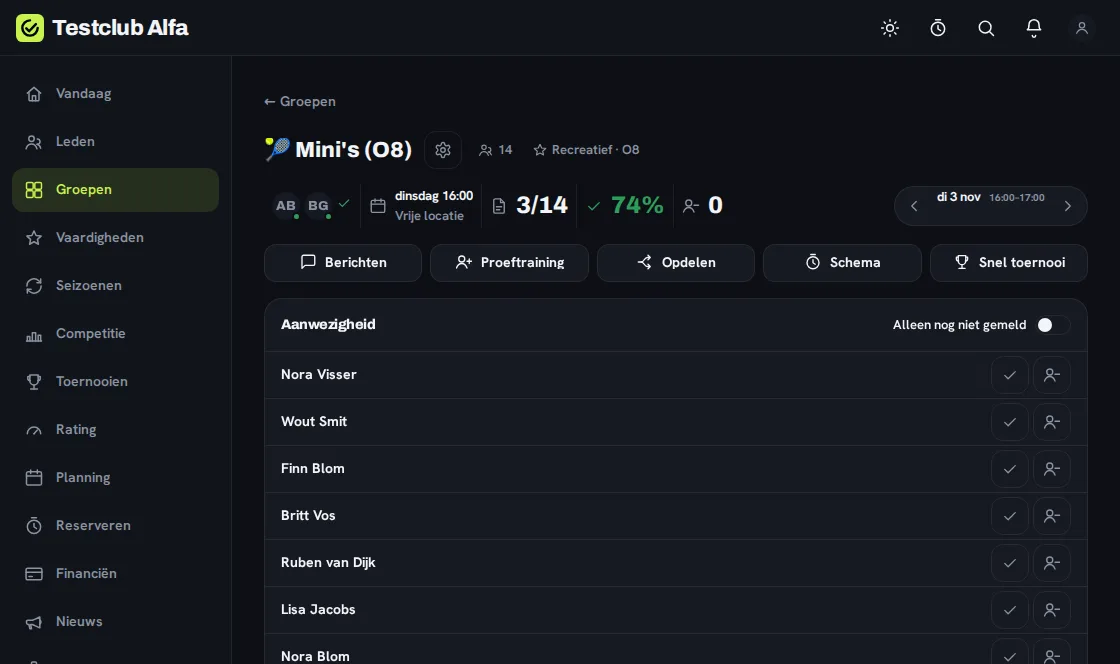
    Three of the fourteen are here. The whistle hasn’t gone yet.

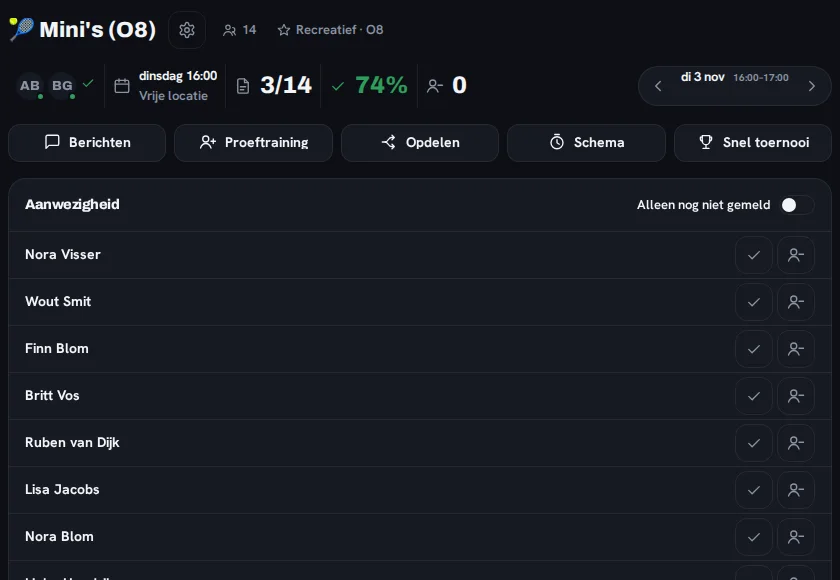
    The coach taps who is there, right on the pitch. No notes, no group chat: the board sees the turnout straight away.

    The Mini's (O8) group: 3 of 14 checked in and 74% turnout, with the member list and a check button per member.A coach crouches among young footballers in red and white shirts on an artificial pitch.
  3. Wednesday 20:15At the kitchen tableBasic

    A mother signs her daughter up for a taster lesson.

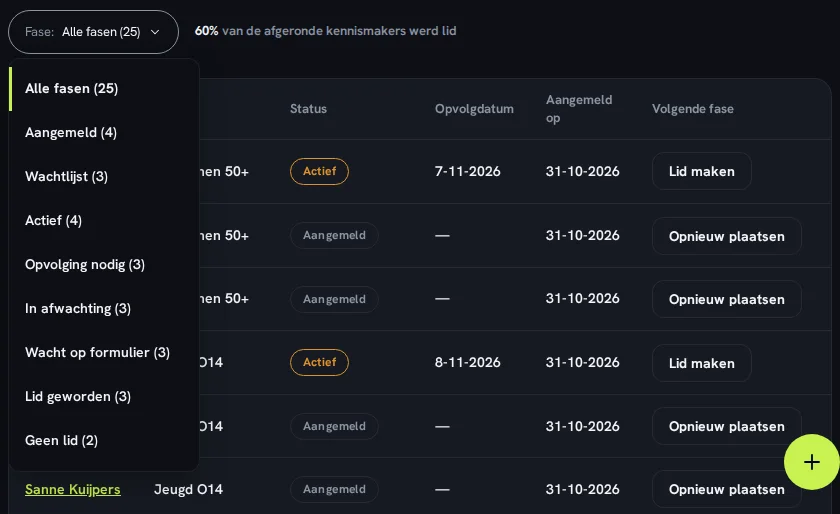
    She enters the intake with a stage and a follow-up date. If the group is full she goes on the waiting list — and nobody loses track of her.

    The trial members: a stage filter (signed up, waiting list, active, needs follow-up, became member) above the list with follow-up dates.A swimming instructor at the pool edge guides a row of children holding kickboards.
  4. Thursday 18:30Sports hall

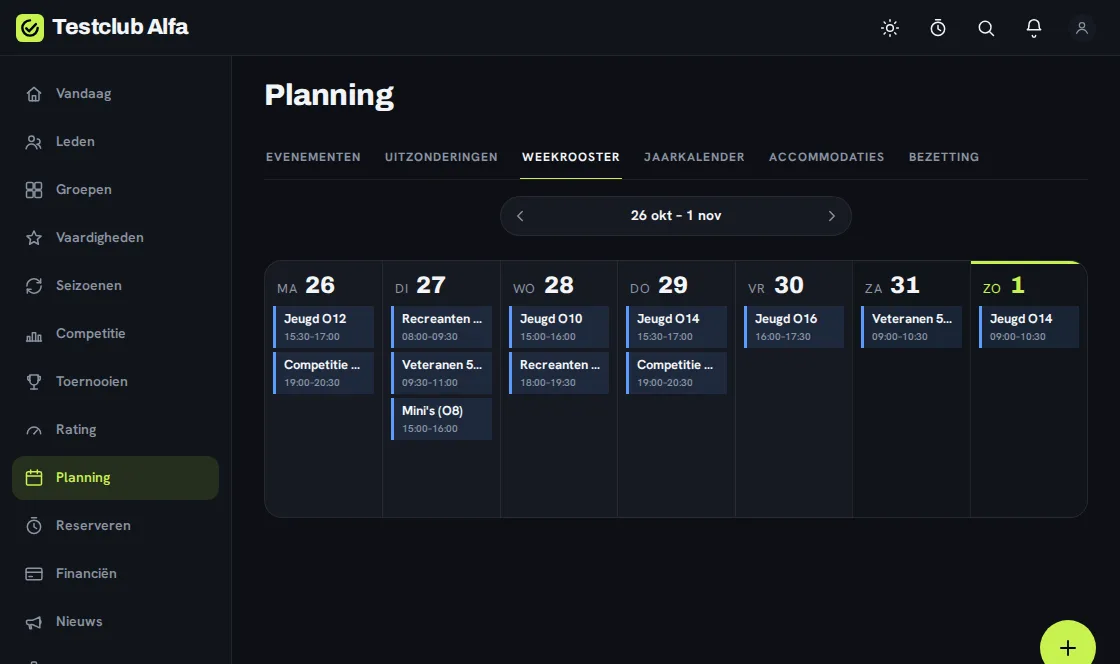
    The hall is closed. The schedule already knows.

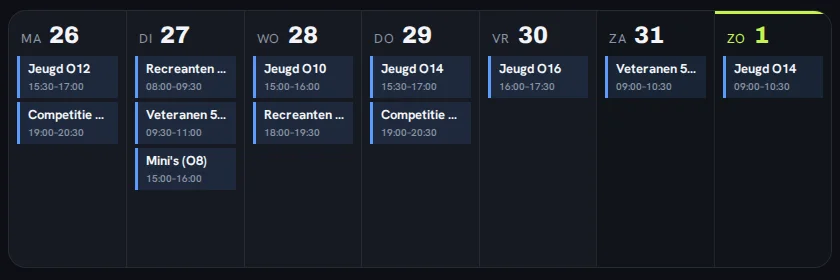
    One exception in the planning and the weekly schedule is right again. When summer starts, the schedule switches to the summer timetable by itself.

    The weekly schedule from Monday to Sunday, listing each day’s training sessions and times.Two volleyball players celebrate with their arms raised in a sports hall, the net behind them.
  5. Friday 21:00At home, on the sofa

    The chair simply asks.

    No report to build, no export: a question in plain language to Club AI. Pseudonymised, within the EU — and a human always decides.

    How was youth turnout this month?

    Club AI is searching the attendance of the youth groups

    Club AI answers from your own club data and shows what the answer is based on.

  6. Saturday 10:00Tournament dayPro

    Pools, schedule and standings. In one place.

    Pools, knock-out, Swiss or a ladder with ELO — the tournament engine works out the schedule, and every result updates the standings at once.

    A football team in blue and white shirts stands in a huddle with arms around each other on an amateur pitch.Close-up of hockey sticks and a ball on blue and green turf during a match.
  7. Sunday 20:00After the weekend

    The whole season, per group, at a glance.

    Which group is filling up, where are members dropping off? The board sees it per group — and Club AI flags it when cancellations rise. On Monday it all starts again.

    The groups overview: nine groups as cards, each with training time, member count and a bar showing how many members checked in.

What does your week look like?

Tell us how big your club is and what you want to manage; the plan finder tells you which plan fits.

Real Club-tool screens with test data. Photos via Unsplash: Adrià Crehuet Cano, Lea Panaino, Vince Fleming, Skytech Aviation, Maximilian Müller.

Front desk

Plan finder

Which plan fits your club?

Slide to your numbers and tick what you want to manage. You will see right away which plan fits and why — no account needed.

How big is your club?
120
8
5
What do you want to manage in Club-tool?

Always included: Members & training groups · Attendance · Scheduling & season roster · Multisport & age categories · Notifications & web push · Member portal · Club news

Advice: Basic€12 / moView ↓

Our advice

Basic€12/ mo

  • €0.20 per successful transaction for online payments
  • 2 months free when billed yearly
Members120 / 300
Training groups8 / 30
Board, coaches & volunteers with an account5 / 15

Why this plan

  • 120 members — Free goes up to 50
  • 8 groups — Free goes up to 5
  • 5 accounts — Free goes up to 3

Try it free for 30 days — no strings attached.

Board room

Club AI — your club data in plain language

Since summer 2026, Club AI has run fully self-hosted on EU infrastructure — not a promise for later, but working functionality in every plan. Four ways it takes work off your board and coaches:

Now live — self-hosted in the EU

  1. Ask your club

    Ask a plain-language question about members, attendance or fees — Club AI reads your own club data and answers right away.

  2. AI in your notes & forms

    Let Club AI draft a news post, email or description from your club’s context. You edit and publish.

  3. Act through a conversation

    Club AI proposes a concrete action — queue a reminder, draft a message — and you confirm or dismiss it. Nothing happens without your click.

  4. Signals you don’t have to hunt for

    Rising cancellations or an overdue fee: Club AI spots the pattern itself and surfaces it as a card on Today, with the evidence attached.

Privacy by default

  • Enabled per club — off by default
  • Pseudonymised before processing
  • EU-hosted, with a GDPR basis & DPIA
  • Sensitive data kept out by default
  • A human always decides

AI suggestion — always verify. Club AI proposes based on your club data; a human decides. (AI Act art. 50)

See Club AI in the club week

Entrance

Security & privacy

House rulesfor your members’ data

Member data is sensitive data. That is why Club-tool is built from the first line of code around need-to-know access and EU hosting.

  1. Multi-factor authentication

    Can be made mandatory for board members and admins.

  2. Passkeys & biometrics

    Sign in without a password, using your phone or laptop's own security.

  3. Strict club isolation

    Every club is its own tenant — no query can ever mix clubs together.

  4. Roles & permissions

    Need-to-know by default: members and coaches only see what their role needs.

  5. Audit log

    Who changed what and when is recorded, including for sensitive data.

  6. EXIF stripping on photos

    Location and device metadata is stripped from uploaded photos.

  7. Data export & consent management

    Members can view, export and withdraw their own data and consents.

A data processing agreement, (sub)processor list, processing register and DPIA are available on request — see the footer.

Canteen

Pricing

Predictable monthly tiers with a member limit as the upgrade trigger — never a surprise cost that grows per contact or member.

Torn between two plans? Let the plan finder decide

Fuse box

For developers

Build on Club-tool

A versioned REST API, an MCP connector for AI assistants and OAuth 2.0 — everything to integrate with a club’s data, with your own API key or a sandbox key that needs no signup.

Do not open without an API key

Circuit 1

Public REST API v2

Versioned at /api/v2, JSON in and out, with an RFC 9457 error contract — for scripts, integrations and data sync.

Circuit 2

MCP connector for Claude

Let an AI assistant like Claude act on a club’s data over OAuth 2.0 and the Model Context Protocol.

Circuit 3

API key management with scopes

A club admin mints keys in the app, with fine-grained read/write scopes per resource, a custom rate limit and an expiry date.

Circuit 4

Tenant isolation, built in

Every key belongs to exactly one club and is its own principal — no call can ever mix clubs together.

Circuit 5

OpenAPI 3.1 & cursor pagination

A generated OpenAPI 3.1 schema as the source of truth, with cursor-based pagination for large collections.

Circuit 6

Sandbox without signup

Mint a read-only 7-day sandbox key against a shared demo club — no account needed to try it.

curl -X POST https://api.arena.club-tool.nl/api/v2/sandbox-keys
{ "key": "ct_test_9f2b…", "expiresAt": "2026-08-02T00:00:00Z", "scopes": ["*:read"] }
curl "https://api.arena.club-tool.nl/api/v2/members?limit=5" \
    -H "Authorization: Bearer ct_test_9f2b…"
{ "data": [ … ], "nextCursor": "mbr_8Xk2" }
Example: mint a sandbox key and fetch the first members

Read the API docs

Club office

Ready to quit spreadsheets?

Start for free with up to 50 members, or jump straight into a 30-day trial of Basic or Pro.